THE GROWING CREATIVE & PROMPT LIBRARY

Great creative.
The prompts behind it.

Stop working backwards from an image you like. Explore creative with the prompts, required inputs and production steps alongside the finished output.

We’re building an expanding collection of standout creative and useful ways to make it. These first 11 recipes are ready to explore, copy and adapt with your own product references, brand colours and creative tools.

Starting collection: 11 recipes · More curated entries planned · Free to browse, copy and download
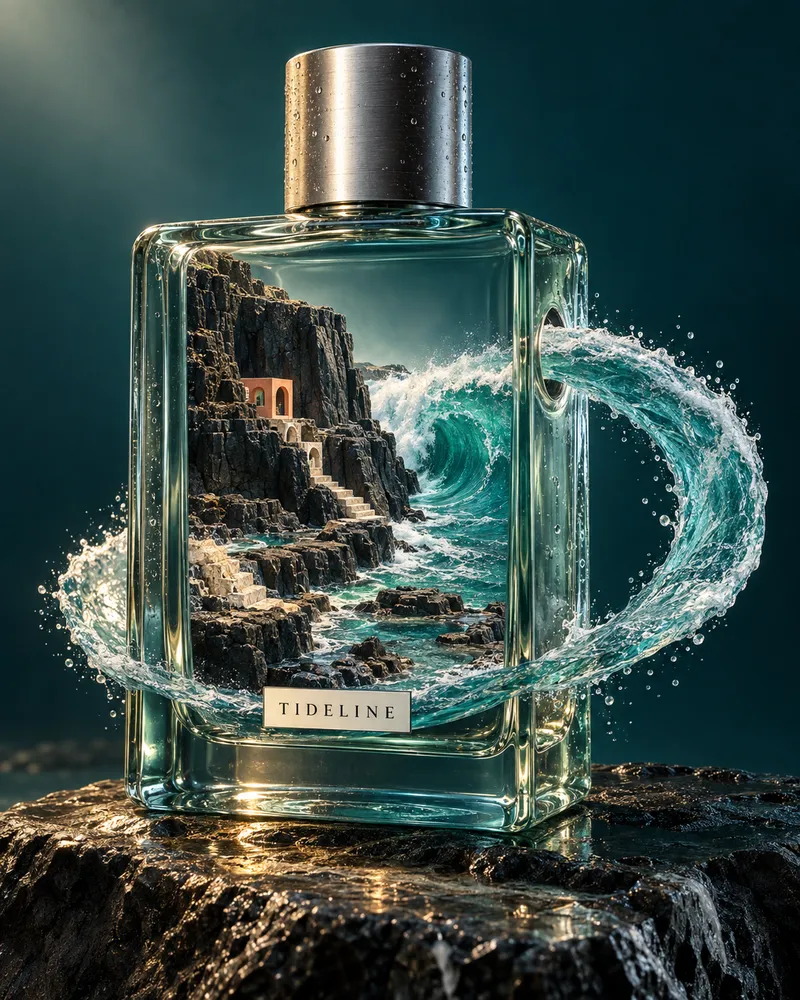
Bottled tides — a world inside your product: fictional SCENE example, not customer work
IMAGESCENE / REVISION 01

Bottled tides — a world inside your product

A surreal fragrance campaign built around a miniature coastline, refracting glass and a sculpted wave. Get the full art direction behind the finished image.

Read the recipe & prompt

Bring these inputs

  • Product reference images and accurate packaging details
  • One central visual idea connected to your product or campaign
  • Brand palette, audience and intended channel
  • Required crop, label text and any elements that must remain unchanged

The method

  1. Choose the world your product will contain. Keep one strong visual idea; define the hero object, scale and silhouette before adding detail.
  2. Adapt the recorded prompt below: replace the fictional fragrance and coastline with your product and campaign concept. Specify geometry, materials, lighting and a restrained palette separately.
  3. Generate in your image tool with your product references. This recorded example was generated in one pass from the text prompt below, without reference images.
  4. Inspect the product shape, label, glass edges, water continuity, miniature architecture and crop. Refine any errors in your tool; outputs will vary.
  5. Keep the finished output, final prompt and references together. Bring them into SCENE as a draft for human review.

Recorded example prompt

Create one exceptional luxury fragrance campaign photograph, portrait 4:5 composition, for a fictional brand called TIDELINE. This is an art-directed surreal product advertising image, a hero example for a creative recipe library. It should reward close inspection but read instantly at thumbnail size: one monumental perfume bottle, one impossible tidal world. Do not create a website, collage, mood board, grid or mockup. CONCEPT — BOTTLED TIDES: A large precise rectangular perfume bottle made from thick pale sea-green optical glass stands on a dark, wet volcanic-stone plinth. The bottle has gently rounded corners, a heavy transparent base and a short cylindrical brushed-aluminium cap. A very small refined ivory label on the lower front reads only “TIDELINE” in perfectly legible black uppercase letters. The bottle fills roughly 65 percent of the frame height, shown at a three-quarter angle, camera slightly below its midpoint. The cap and entire bottle remain in frame. IMPOSSIBLE WORLD, PRECISELY COMPOSED: Inside the glass, an exquisitely detailed miniature coastal landscape occupies the lower two thirds: dark stratified basalt cliffs, narrow ivory limestone steps carved into the cliff face, tiny tidal pools, and a single dramatic turquoise curling wave. The crest exits through a clean circular aperture in the bottle’s right wall, becoming one elegant continuous arc of water that sweeps around the outside of the bottle and returns to the miniature sea. The wave must read as water with translucency, froth and surface tension, not a ribbon of plastic. Its overall silhouette is a controlled ellipse, framing the product without hiding the label. One small warm-coral architectural pavilion nestles into the cliffs, giving scale and one deliberate contrasting accent. No people, no boats, no extra buildings, no vegetation. MATERIAL AND SCALE: Physically convincing glass thickness, local refraction and caustics, subtle optical distortion where the miniature cliffs are seen through glass, tiny water droplets on the exterior, micro-texture on the aluminium cap, mineral veins and salt residue on the plinth. The miniature coastline is hyperreal, like an impossibly meticulous physical model photographed in a real luxury studio. Preserve clear separation between the glass bottle, the interior world and the exterior wave. LIGHT AND COLOUR: Deep petrol-teal seamless studio background, visibly brighter than black. A large soft warm key light from the upper left models the bottle and cliff textures; a narrow cool rim from behind the right edge illuminates the wave and glass. A restrained pool of golden refracted light falls onto the wet stone at the front. Palette: petrol teal, translucent turquoise, warm limestone, brushed silver, one coral accent. Strong but controlled contrast; dark details remain visible. No purple, neon glow, random particles or lens flare. FINISH: A meticulously art-directed editorial luxury campaign still, sophisticated material realism, medium-format advertising photography feel, 80 mm lens perspective, depth of field sufficient to resolve the miniature scene while the distant backdrop stays smooth. Leave breathing room around the hero silhouette. The wave, glass, cliffs and lighting must form one coherent designed composition. No added headline, no tagline, no watermark, no extra products. This is fictional creative, not a real fragrance or a performance claim.

Example provenance

Created for SCENE on 29 September 2026 using built-in image generation. One text-only generation; no reference image or post-generation retouching. Exact submitted prompt retained below. Fictional fragrance and architecture; no customer or performance claim. Creative direction: SCENE.

Adapt with care

  • TIDELINE is a fictional demonstration, not a customer campaign or a performance claim.
  • The impossible scene is a creative treatment, not a claim about product ingredients or properties.
  • Real products need reference assets and a packaging and brand-fidelity check. Exact output is not guaranteed.

Some examples were produced with image-generation tools during development. SCENE does not generate images or video in the app.
Download the full recipe
VIDEOSCENE / REVISION 01

AERO — a ten-second launch film

A listening moment, tactile detail and a bold product reveal: a ten-second vertical campaign film with its prompts and edit direction.

Read the recipe & prompt

Bring these inputs

  • Approved product references and a person’s portrait you have permission to animate
  • Brand name, palette and one short campaign line
  • Three consistent product compositions: macro detail, frontal reveal and hero

The method

  1. Prepare the portrait and three product images with consistent headphone design and materials.
  2. Animate the listening portrait in HeyGen with the recorded motion prompt and a three-second silent audio track.
  3. Build the four-shot ten-second edit using the timing below; add licensed sound and a separate synthetic voice-over.
  4. Check playback, readable captions, product consistency and the held final brand frame; export MP4 and retain source prompts.

Example production direction

EDIT DIRECTION Create a ten-second 9:16 launch film at 30 fps. 0–2.6s: a subtle AI-animated profile listening moment, with “Make room for sound.” 2.6–4.3s: hard cut to leather and champagne-metal detail; move laterally across the still with “EVERY DETAIL.” 4.3–7.3s: an ivory wipe reveals frontal headphones and orange ribbon; AERO branding settles into place. 7.3–10s: cut to the three-quarter hero with a rising ivory brand panel; hold the final mark. Separate synthetic voice-over: “Make room for sound. Meet AERO.” A restrained whoosh and bass impacts punctuate the reveals. Preserve the portrait watermark. Do not imply product capabilities or a customer endorsement. LISTENING ANIMATION PROMPT A quiet cinematic listening moment. Preserve this exact person, the side profile and downward gaze, hoodie and headphone design. Subtle breathing and a very small natural head movement as he listens. No speech, no mouth talking, no turn toward camera, no invented hand actions. Keep composition steady and photographic. ORIGINAL HERO IMAGE PROMPT Create a spectacular premium product launch photograph, portrait 9:16, for a fictional audio brand AERO. A single sculptural pair of ivory over-ear headphones, three-quarter view, suspended at a slight diagonal over a vivid burnt-orange seamless studio surface. Precision brushed champagne aluminium ear cups with exceptionally fine radial machining, cream leather cushions with real stitching, smooth arched ivory headband, only tiny engraved AERO branding on one earcup. One long satin orange ribbon arcs behind and below the headphones in a clean sculptural elliptical curve, echoing sound waves; never obstruct product details. Warm directional light, cool white rim reflections across metal, long soft shadow, medium-format macro advertising realism. Beautiful tactile material contrast, controlled colour, no neon or purple, no clutter, no exploded pieces, no extra earcups. Product occupies central 60 percent of frame with 20 percent clean orange negative space top and bottom for later typography. Composition is luxurious, graphic and unexpectedly dynamic, not a generic catalogue image. No headline, no captions, no watermark. Fictional demonstration, no real product or performance claims. PORTRAIT ADAPTATION PROMPT Edit image 1, the outdoor side-profile photograph of a person in a grey hoodie wearing blue Beats headphones, for a clearly fictional AERO headphone campaign. Preserve this exact person's identity, face, skin, beard, profile, downward gaze, grey hoodie, pose, natural daylight and outdoor setting. Replace ONLY the visible blue branded headphones with a physically plausible matching set of the fictional AERO headphones shown in image 2: ivory padded headband, champagne brushed aluminium circular earcup with fine radial machining, cream leather cushion, slim polished champagne metal yoke, small subtle AERO engraving. Fit the headphones naturally OVER the hoodie exactly where the original headphones sit; convincing contact, scale, shadows, perspective and occlusion. Remove the original Beats b logo by replacing the headphone itself, not blurring it. Do not change the person's face or make him face the camera. Keep the premium documentary photographic quality. Retain portrait aspect ratio; no text overlay, no caption, no watermark, no new logo beyond tiny fictional AERO engraving. This is an illustrative fictional brand study, not an endorsement or factual product-use photograph. MACRO IMAGE PROMPT Cinematic product launch film keyframe, one single 9:16 vertical photograph, no typography or graphic layout. Match the EXACT fictional AERO headphones in the reference: ivory padded leather, champagne brushed aluminium circular earcups, polished yoke, tiny AERO engraving. Shoot an extreme macro from a radically lower oblique angle: the curved metal edge of ONE earcup sweeps diagonally through lower right, radial machining glistens in one narrow hard warm strip light, ivory stitched cushion catches a second rim. Background very dark burnt umber with a restrained amber glow, NOT blue or purple. Gorgeous premium film still, anamorphic optical falloff but no fake black bars, large-format macro cinematography, almost abstract tactile material landscape with clear controlled light and rich visible dark detail. Deliberate negative space in upper third. This is a new camera angle of the same product, not a crop of the reference. No extra products, no explosion, no disassembled parts, no additional text or watermark. Production quality of a luxury headphone launch movie. FRONTAL REVEAL IMAGE PROMPT Create a cinematic 9:16 vertical product-film keyframe using the supplied AERO headphones as the strict product reference. New shot, entirely different viewpoint: camera directly front-on and slightly below, the full pair of ivory over-ear headphones suspended symmetrically in the centre, both circular champagne-brushed aluminium earcups and cream stitched cushions, same slim polished yokes and padded arched ivory headband. One sculptural burnt-orange satin ribbon makes a broad spiral behind the headphones, leading from the far background toward the lower foreground without hiding the product. A seamless burnt-orange cyclorama, a soft elliptical shadow below. Strong sculptural rim light around the silhouette; large soft studio reflections, luxury automotive launch cinematography translated to audio product. Product fills middle 60 percent, generous empty burnt-orange space above and below for later AERO typography. Precision tactile leather and radial metal machining. No headline, no caption, no poster layout, no particles, no extra earcups, no extra products. Tiny original AERO engraving may remain. Photoreal physical stage; exquisite composition, dramatic but clear, not a generic catalogue packshot.

Example provenance

SCENE fictional campaign, 30 September 2026. Ten-second edit: user-selected portrait adapted to AERO headphones and animated in HeyGen, three generated product stills, synthetic voice-over and bundled sound effects. No real testimonial or performance claim.

Adapt with care

  • Fictional AERO concept; no real product specifications, testimonial or customer results.
  • AI-animated portrait plus motion-designed product stills; not generated footage of a moving or assembling product.
  • HeyGen free-plan watermark is retained. The voice-over is synthetic and separate from the pictured person.
  • SCENE stores creative and provenance; generation and rendering take place in external creative tools.

Some examples were produced with image-generation tools during development. SCENE does not generate images or video in the app.
Download the full recipe
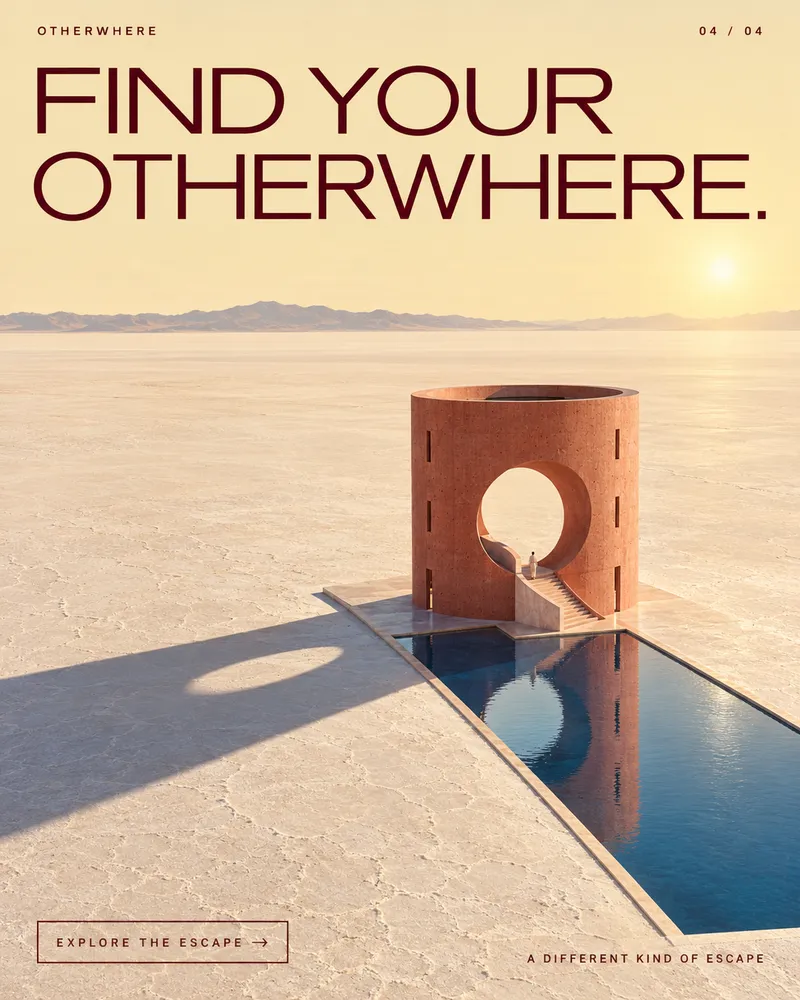
Minimalist product image: fictional SCENE example, not customer work
IMAGESCENE / REVISION 01

Minimalist product image

A reusable minimalist direction for image content, adapted to your campaign and brand.

Read the recipe & prompt

Bring these inputs

  • Campaign objective and intended audience
  • Product facts and reference assets
  • Brand requirements, if available
  • Target channel and call to action

The method

  1. Set the product reference, brand palette and desired crop. Identify any missing product details.
  2. Place the product on a simple seamless surface with soft side light, a grounded shadow and generous negative space. Preserve product identity.
  3. Generate with an image-capable tool. Inspect edges, geometry, shadows and brand fidelity. Export a channel-compatible image; send it to SCENE as a draft.

Recorded example prompt

Use case: product-mockup. Create one portrait 4:5 minimalist product photograph for a SCENE creative-recipe demonstration. Subject: an unbranded warm-white ceramic desktop lamp with a rounded mushroom dome and cylindrical stem, on a pale chalk seamless studio surface. Soft side daylight, natural grounded shadow, generous negative space, precise premium editorial composition. Muted ivory palette, realistic ceramic texture. No text, logos, people or watermark. This is a fictional product demonstration.

Example provenance

Genuine built-in image-generation output, produced 8 September 2026 for a fictional ceramic lamp. No customer or performance claim. Generated without a product reference; the shape varies between treatments. Use a real product reference for identity-sensitive work.

Adapt with care

  • Brand requirements take precedence over a visual treatment. Surface conflicts for human review.
  • Use supported product facts; never invent customer, revenue or performance claims.
  • Example outputs demonstrate the recorded version and tool, not a guarantee of identical results.

Some examples were produced with image-generation tools during development. SCENE does not generate images or video in the app.
Download the full recipe
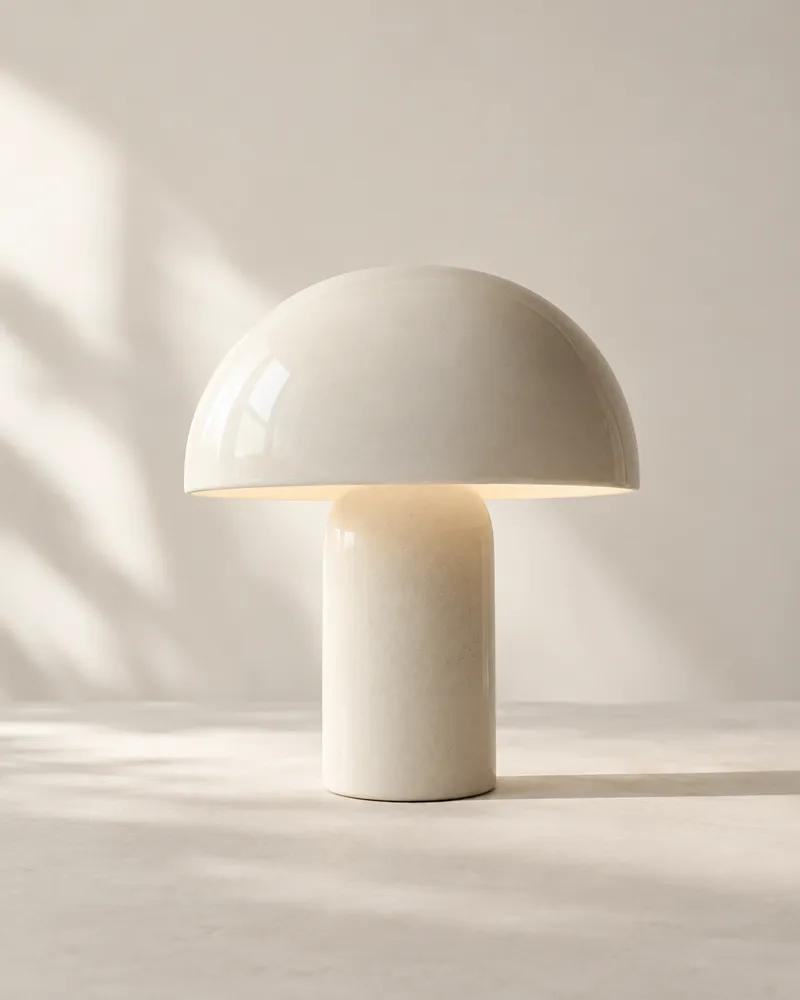
Monochrome editorial image: fictional SCENE example, not customer work
IMAGESCENE / REVISION 01

Monochrome editorial image

A reusable monochrome direction for image content, adapted to your campaign and brand.

Read the recipe & prompt

Bring these inputs

  • Campaign objective and intended audience
  • Product facts and reference assets
  • Brand requirements, if available
  • Target channel and call to action

The method

  1. Check whether the brand allows black-and-white work. If colour is mandatory, stop and present the conflict.
  2. Use the product reference in a sculptural editorial composition, hard directional light, textured surfaces and controlled negative space. Request monochrome only.
  3. Inspect product identity and shadow detail. Export a compatible image and retain the exact prompt with the draft.

Recorded example prompt

Use case: product-mockup. Create one portrait 4:5 monochrome editorial product photograph for a SCENE creative-recipe demonstration. Fictional unbranded ceramic desktop lamp, mushroom dome and cylinder stem, staged on a brutalist concrete plinth. Strict black and white, directional hard side light, deep sculptural shadow, tactile ceramic and concrete, premium magazine photography, architectural negative space. No text, logos, people or watermark. Demonstration only.

Example provenance

Genuine built-in image-generation output, produced 8 September 2026 for a fictional ceramic lamp. No customer or performance claim. Generated without a product reference; the shape varies between treatments. Use a real product reference for identity-sensitive work.

Adapt with care

  • Brand requirements take precedence over a visual treatment. Surface conflicts for human review.
  • Use supported product facts; never invent customer, revenue or performance claims.
  • Example outputs demonstrate the recorded version and tool, not a guarantee of identical results.

Some examples were produced with image-generation tools during development. SCENE does not generate images or video in the app.
Download the full recipe
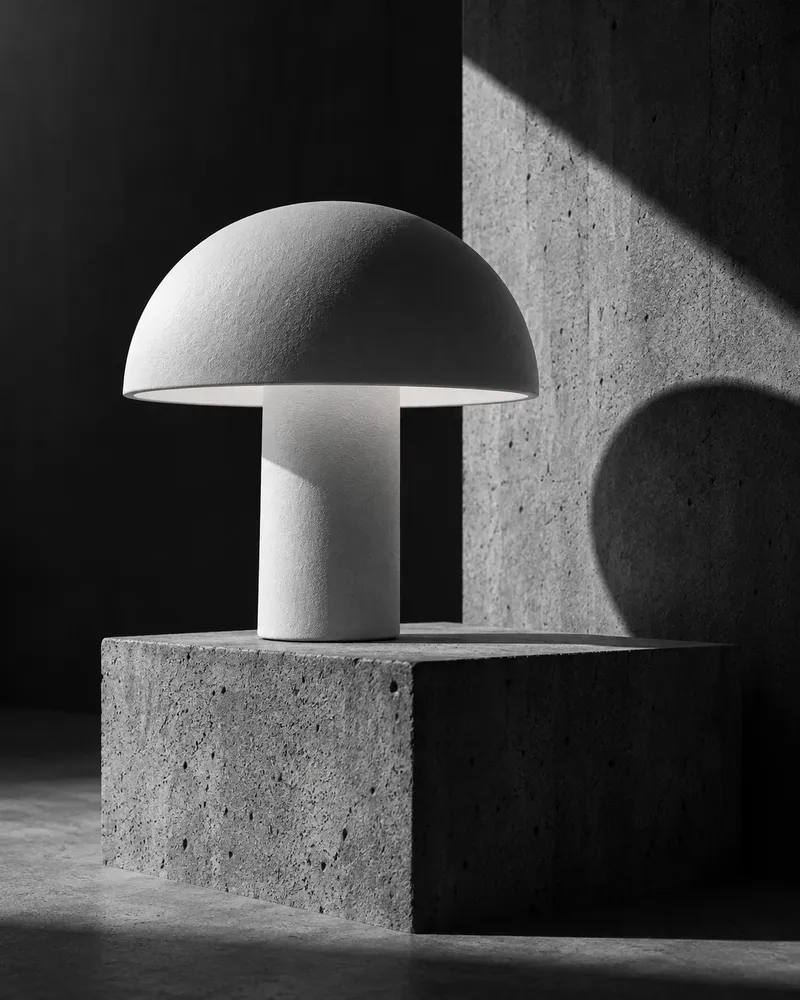
Cinematic product image: fictional SCENE example, not customer work
IMAGESCENE / REVISION 01

Cinematic product image

A reusable cinematic direction for image content, adapted to your campaign and brand.

Read the recipe & prompt

Bring these inputs

  • Campaign objective and intended audience
  • Product facts and reference assets
  • Brand requirements, if available
  • Target channel and call to action

The method

  1. Use verified product references and choose a brand-compatible cinematic palette.
  2. Stage the product with motivated practical light, a subtle rim light and a believable environment. Describe atmosphere and depth of field without changing the product.
  3. Inspect the result for invented details, illegible markings or excessive effects. Export and submit a draft.

Recorded example prompt

Use case: product-mockup. One portrait 4:5 cinematic product photograph for a SCENE recipe demonstration. A fictional unbranded ceramic desktop lamp with mushroom dome and cylindrical stem glows warm amber on a dark smoked-oak desk in a midnight-blue room. Dramatic rim light, soft atmospheric haze, subtle film grain, believable pools of light, shallow depth of field, elegant negative space. Premium film-still composition. No text, logos, people or watermark. Fictional product demonstration.

Example provenance

Genuine built-in image-generation output, produced 8 September 2026 for a fictional ceramic lamp. No customer or performance claim. Generated without a product reference; the shape varies between treatments. Use a real product reference for identity-sensitive work.

Adapt with care

  • Brand requirements take precedence over a visual treatment. Surface conflicts for human review.
  • Use supported product facts; never invent customer, revenue or performance claims.
  • Example outputs demonstrate the recorded version and tool, not a guarantee of identical results.

Some examples were produced with image-generation tools during development. SCENE does not generate images or video in the app.
Download the full recipe
VIDEOSCENE / REVISION 01

Product-demonstration reel

A reusable screen-demo direction for finished video content, adapted to your campaign and brand.

Read the recipe & prompt

Bring these inputs

  • Campaign objective and intended audience
  • Product facts and reference assets
  • Brand requirements, if available
  • Target channel and call to action

The method

  1. Choose one product workflow and verify it works. Prepare a clean demonstration environment with no private data.
  2. Capture the before state, the user action and the completed result. Add short readable captions for each step and leave space for channel overlays.
  3. Assemble a short vertical video, inspect the beginning, action and result, and export H.264 MP4. Submit the video as a draft with the capture and editing instructions.

Example production direction

Demonstrate a fictional day planner: empty day, add Share the product launch, schedule Tomorrow 09:00. Capture three actual UI states and assemble a 9-second silent vertical reel.

Example provenance

Finished 720×1280, 24fps, 9-second silent reel. It uses captures of a small interactive fictional app created in scripts/render-recipe-examples.mjs; not a customer product or full-motion screen recording.

Adapt with care

  • Brand requirements take precedence over a visual treatment. Surface conflicts for human review.
  • Use supported product facts; never invent customer, revenue or performance claims.
  • Example outputs demonstrate the recorded version and tool, not a guarantee of identical results.

Some examples were produced with image-generation tools during development. SCENE does not generate images or video in the app.
Download the full recipe
VIDEOSCENE / REVISION 01

Cinematic launch reel

A reusable cinematic direction for finished video content, adapted to your campaign and brand.

Read the recipe & prompt

Bring these inputs

  • Campaign objective and intended audience
  • Product facts and reference assets
  • Brand requirements, if available
  • Target channel and call to action

The method

  1. Choose a short sequence that moves from atmosphere to detail to product reveal. Use verified product imagery; keep identity consistent for a real campaign.
  2. Prepare a vertical edit with intentional pacing and restrained fades. If using still images, describe it as a still-image edit; if generating footage, inspect motion and continuity separately.
  3. Export a finished H.264 MP4, inspect the full playback and safe crop, record source prompts and any licensed audio, and submit as a draft.

Example production direction

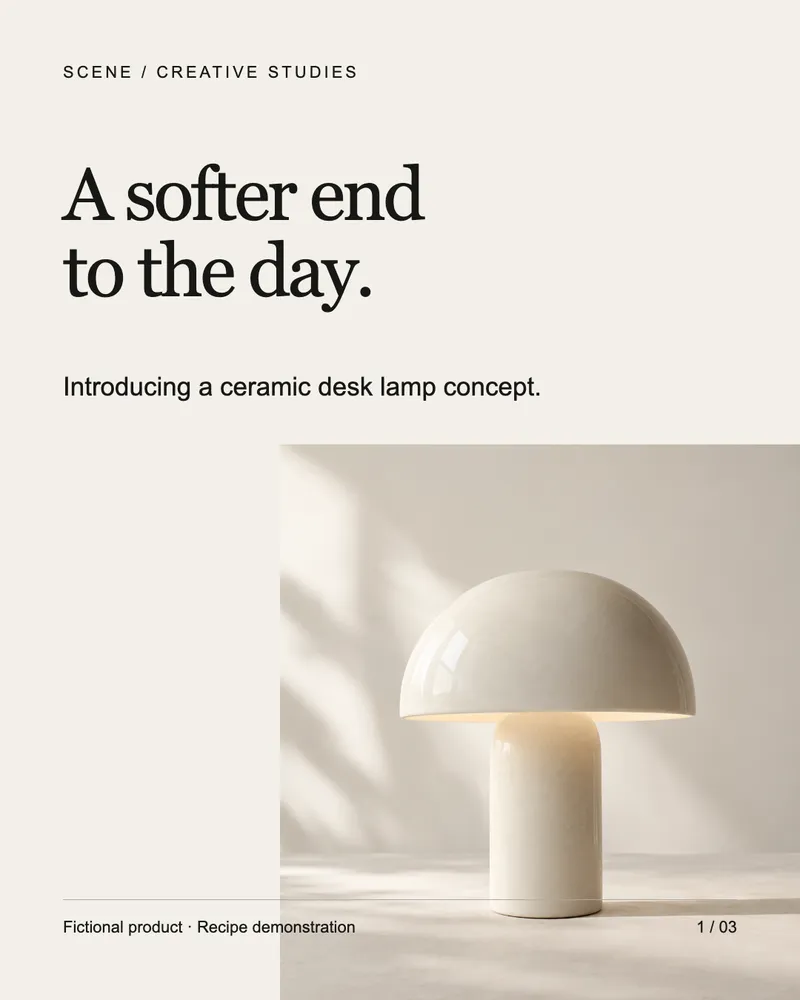
Assemble cinematic-product.png, monochrome-editorial.png and minimalist-product.png as a 9-second 720×1280, 24fps silent vertical edit. Three equal-duration shots, short fades, no invented product claims.

Example provenance

Finished still-image editorial reel, not generated live-action footage. Three genuine generated studies of a fictional lamp have visible identity differences; real product campaigns need reference-locked sources. Production code is in scripts/render-recipe-examples.mjs.

Adapt with care

  • Brand requirements take precedence over a visual treatment. Surface conflicts for human review.
  • Use supported product facts; never invent customer, revenue or performance claims.
  • Example outputs demonstrate the recorded version and tool, not a guarantee of identical results.

Some examples were produced with image-generation tools during development. SCENE does not generate images or video in the app.
Download the full recipe
LINKEDIN / EXAMPLE COPY

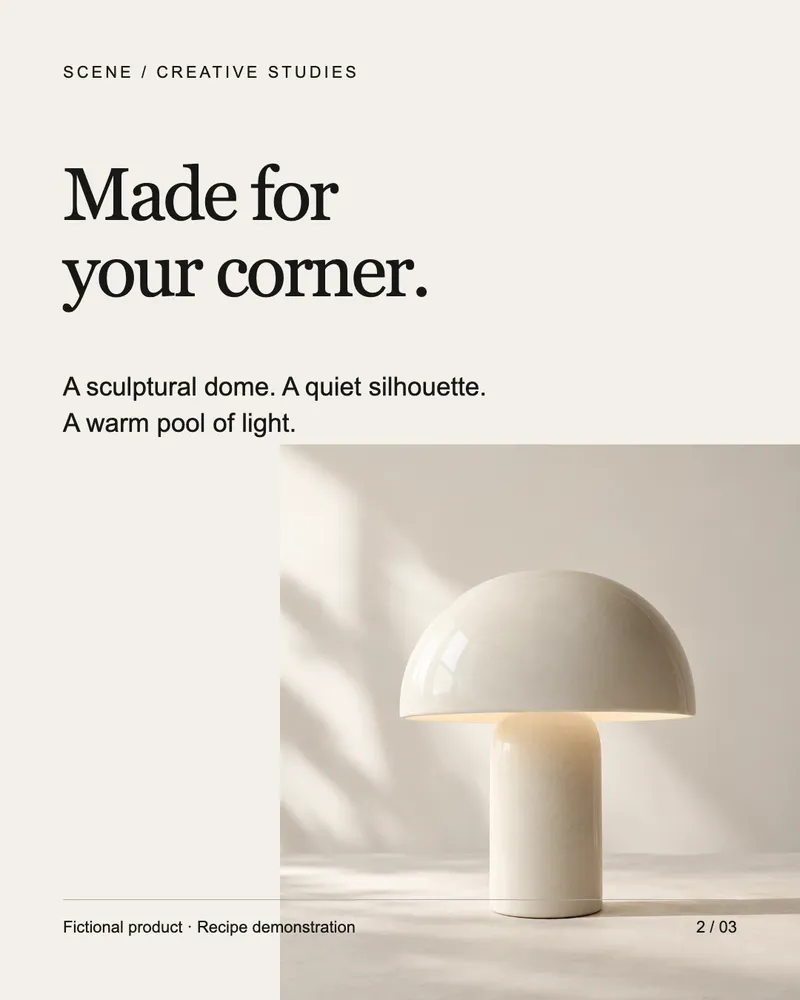
“I wanted a quieter way to finish a day at my desk.”

Read the complete text example ↗
TEXTSCENE / REVISION 01

LinkedIn launch announcement

A reusable founder-led direction for text content, adapted to your campaign and brand.

Read the recipe & prompt

Bring these inputs

  • Campaign objective and intended audience
  • Product facts and reference assets
  • Brand requirements, if available
  • Target channel and call to action

The method

  1. Start with the specific problem the founder experienced. Explain what the product does using verified facts.
  2. Describe the current release stage honestly, add one next action and adapt the voice to the brand. Avoid invented testimonials or traction.
  3. Read the draft aloud, verify the link and claims, then submit text for review. LinkedIn publishing remains on the direct-integration roadmap.

Recorded example prompt

Write a concise founder announcement for a fictional ceramic desk lamp concept. Explain the desire for calmer desk lighting. Explicitly state these are concept images, not a manufactured product. End by asking what readers value in desk lighting.

Example provenance

Original written example. No actual release, customer or performance evidence.

Adapt with care

  • Brand requirements take precedence over a visual treatment. Surface conflicts for human review.
  • Use supported product facts; never invent customer, revenue or performance claims.
  • Example outputs demonstrate the recorded version and tool, not a guarantee of identical results.

Some examples were produced with image-generation tools during development. SCENE does not generate images or video in the app.
Download the full recipe
FROM A USEFUL PROMPT TO A REVIEWED POST

From someone else’s example
to your own campaign.

01 / ADAPT

Bring your brand.

Add the audience, product references and voice. These examples use fictional products; adapt the instructions to your real facts.

02 / CREATE

Use your preferred tools.

Take the recipe to your image, layout or video tool—or use it to brief your agent. Keep the prompt and source with the output.

03 / REVIEW

Make the final call.

Bring the creative into SCENE as a draft. Review the exact version, caption and destination before approving it.

Try the campaign workflow ↗
COMMUNITY LIBRARY / IN PREPARATION

A library that grows with its creators.

We plan to grow the collection through selected creative and reviewed community contributions: prompts, skills, hooks, formats, visual directions and finished examples. Our bar is strong creative, useful instructions and an output you can inspect. Human review and creator credit come first; community submissions, sharing and ratings are not open yet.

Request access to the free private beta ↗